Browser music video recorder
The performance becomes one local video file.
Gesture Synth records the rendered camera stage rather than a separate screen capture. The file includes the mirrored performance view, responsive visual effects, current finger feedback, and the same limited Web Audio signal sent to the speakers. It never requests microphone access.
Free Play can record an open melody, chords, or a two-hand duet. Song Quest can include the current cue, full-song progress, score, combo, and timing feedback when Include score HUD is enabled. That option is available only when the score has meaningful game information.
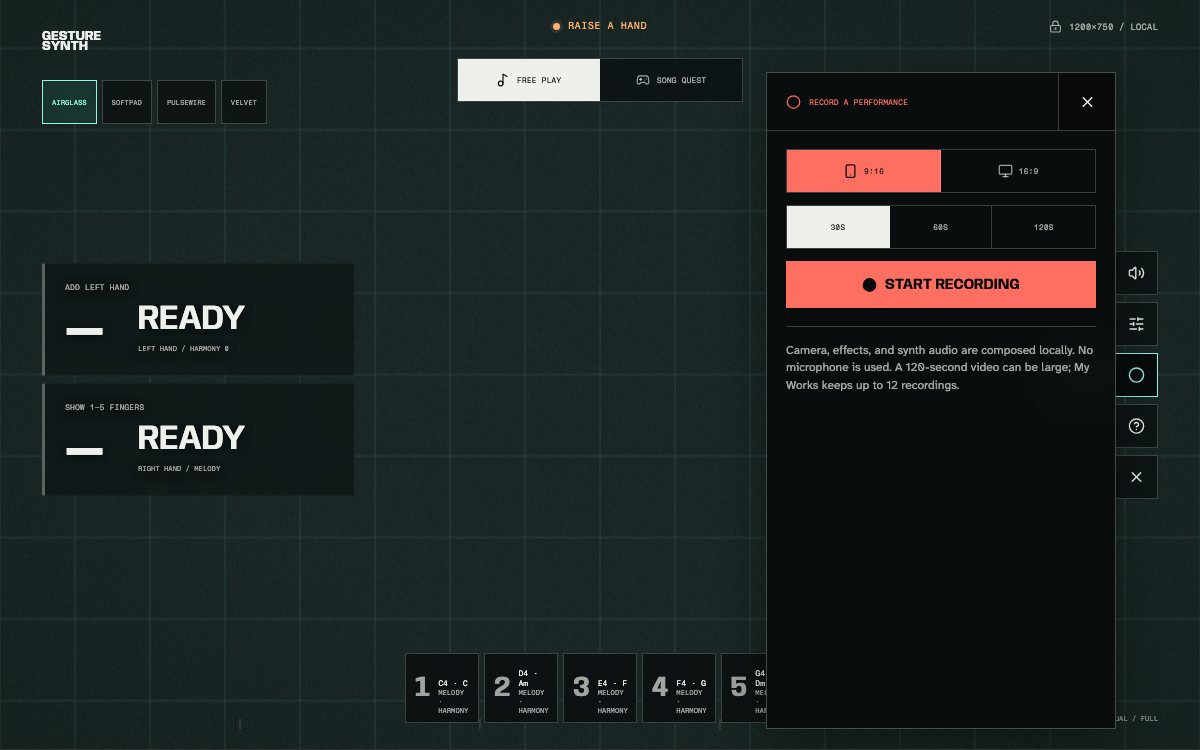
Choose the frame and duration before the local recording countdown begins.
Set up the capture
Choose the musical mode before recording.
- Start Gesture SynthAllow video camera access and wait until the local tracker is ready. No account or microphone permission is needed.
- Choose Free Play or Song QuestSelect the voice and musical role first. A Song Quest selection can apply its recommended voice automatically.
- Open Recording controlsUse the circular record command at the side or bottom of the active stage.
- Select frame and durationChoose portrait or landscape, then 30, 60, or 120 seconds.
- Start after the three-countThe file timer begins only after the visible countdown finishes. Stop manually at any point or let the selected duration end it.
Duration and aspect ratio
Match the file to the performance and destination.
- 9:16 portrait
- 720 × 1280
- A vertical frame for phone-first playback, Shorts, Reels, TikTok, and portrait stories.
- 16:9 landscape
- 1280 × 720
- A wide frame for two-hand playing, desktop viewing, presentations, and conventional video players.
- 30 seconds
- Fast capture
- Best for short Free Play ideas and most single-phrase performances. It is the default duration.
- 60 seconds
- Complete Song Quest
- Use this when the song plus its count-in would cross 30 seconds. The picker recommends it automatically when needed.
- 120 seconds
- Long performance
- Useful for extended improvisation, but it creates a much larger local file and uses more browser storage.
- MP4 or WebM
- Browser-selected format
- The recorder tests available encoders at runtime. The exact file type depends on browser and operating-system support.
When Song Quest recommends 60 seconds, changing back to 30 seconds can cut off the final notes even if the musical phrase itself appears shorter.
My Works
Revisit recordings saved in this browser.
After a recording finishes, the current result remains available immediately for preview and download. Gesture Synth also attempts to save a copy in IndexedDB, the browser's local storage system. My Works can keep up to 12 recordings within an approximate 350 MB budget.
Each work shows its date, duration, aspect ratio, format, performance mode, selected song when applicable, and synth voice. Video previews open paused so visiting the library never starts unexpected sound. Deleting a work requires confirmation, while downloading keeps an independent file outside browser storage.
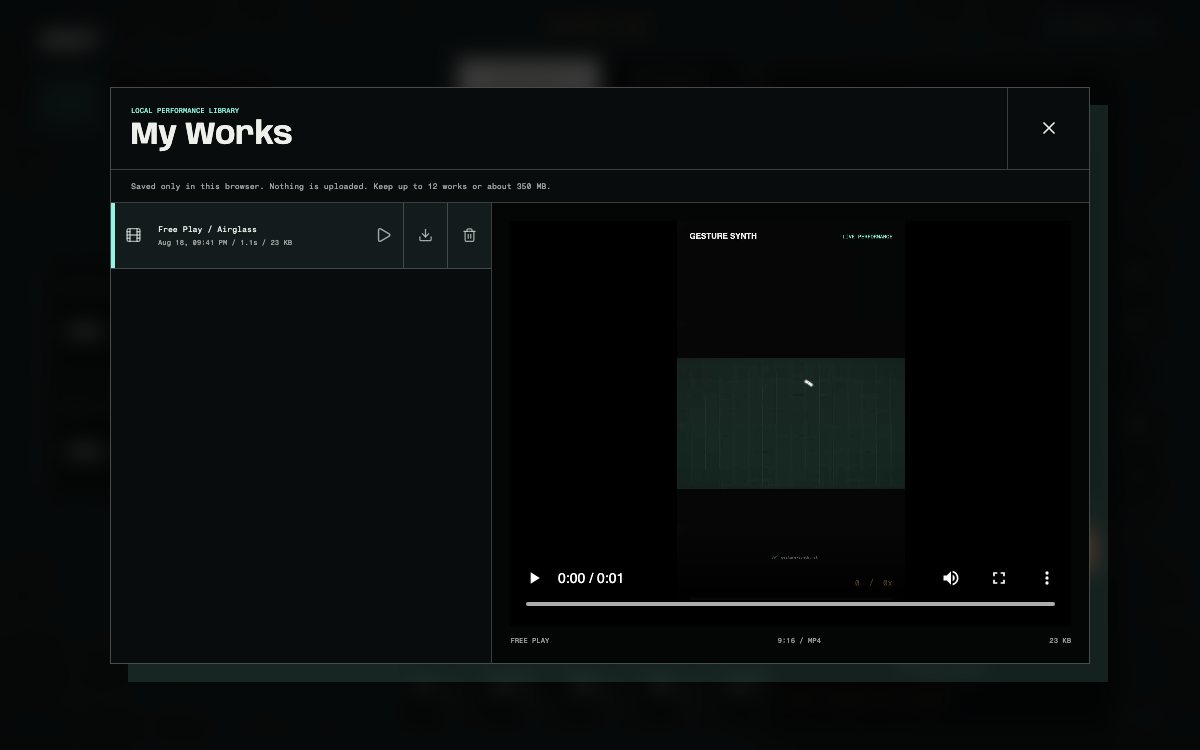
My Works identifies each local recording by time, format, mode, song, and voice.
Privacy and storage failures
A storage error must not take away the current file.
Camera frames, hand landmarks, the synthesized audio bus, recording file, and My Works database remain local. Optional aggregate analytics never receive camera footage, hand data, synth audio, or recording files.
Private browsing, browser quotas, or a full device can prevent IndexedDB storage. In that case, Gesture Synth keeps the finished video on the current result screen and explains that it was not added to My Works. Download it before replacing the result or closing the page. Read the privacy policy for the complete data boundary.